Tech ConversionInsights14 October 202628 min
How to choose a WordPress development company: a buyer's guide for 2026
What a WordPress development company should actually do, the three ways a WordPress site gets built, the eight questions to ask before you hire, what you must own at the end, and the red flags that cost owners the most.
WordsMohammed Imran M
Most business owners hire a WordPress development company the way they would hire a painter. They look at a few finished jobs, compare three quotes, pick the one in the middle and hope for the best. Sometimes that works. More often, eighteen months later, the site is slow, nobody on the team dares to update it, the person who built it has moved on, and the business is paying again to rebuild something it already paid for once.
This guide is meant to stop that from happening. It is written for owners and managers of small and mid-sized businesses who are about to choose a WordPress development company, or who already have a WordPress site and are not sure whether to repair it or start again. It explains what the work actually involves, the three very different ways a WordPress site gets built, the questions that separate a careful company from a careless one, what you must own when the project ends, and the warning signs to walk away from.
We are a WordPress development company ourselves, so read this with that in mind. Nothing below depends on hiring us. If you use it to hire someone else well, it has done its job.
What a WordPress development company actually does
WordPress is free software. Anyone can install it in a few minutes, and thousands of people sell themes and plugins for it. So a fair question is what you are paying a company for.
The honest answer is judgement and craft, applied to four jobs that a theme and a weekend cannot do for you.
The first job is deciding what the site has to say and to whom. A site that tries to speak to everyone says nothing in particular, and a theme demo is written for nobody. A good company spends the first part of the project understanding your business, your customers and your competitors, and only then decides what pages you need and what each one is for.
The second job is building the structure that makes the site fast, findable and easy to edit. That means a theme written for your content rather than for every possible business, content blocks named in your language, sensible URLs, search settings, structured data, image handling and a short, deliberate plugin list.
The third job is protecting what already works. If you have an existing site, it has pages that rank, links pointing at it and enquiries arriving through it. A rebuild that forgets those can lose in a week what took years to earn. A careful company maps every old address to its new one before anything goes live.
The fourth job is leaving you in control. When the project ends, your team should be able to publish, edit and grow the site without calling anyone, and you should own every account and every line of code.
Everything else, from the colour palette to the animation on the menu, sits on top of those four. A company that talks mostly about the colour palette is selling the top layer.
Is WordPress still the right choice in 2026?
Before choosing a company, it is worth being sure about the platform. WordPress is a sensible choice for a large share of business websites, but not for all of them.
WordPress suits you when publishing is a big part of the site's job. If your team will add articles, case studies, service pages, team members or news regularly, WordPress gives them an editor most people can learn in an afternoon, and there is a large pool of developers who can maintain it. It also suits you when you want to own the site outright and move it between hosting companies freely.
WordPress is less suitable when the site is really an application. If the core of the project is a customer portal, a booking engine with complex rules, a dashboard, or heavy integration with other software, a custom-built site is often simpler and faster in the long run. We wrote a separate guide on that choice: custom web development vs website builders and templates.
It is also less suitable for a very small site that will rarely change. If you need four pages, a contact form and nothing else, a well-chosen website builder or a simple template can be enough, and a WordPress development company that tells you so is one worth trusting.
A good WordPress development company will sometimes tell you not to use WordPress. That answer costs them a sale, which is exactly why it is worth listening to.
The three ways a WordPress site gets built
This is the part most buyers never hear about, and it explains most of the difference between quotes. Two companies can both say "we build WordPress websites" and mean completely different things.
Approach one: a marketplace theme
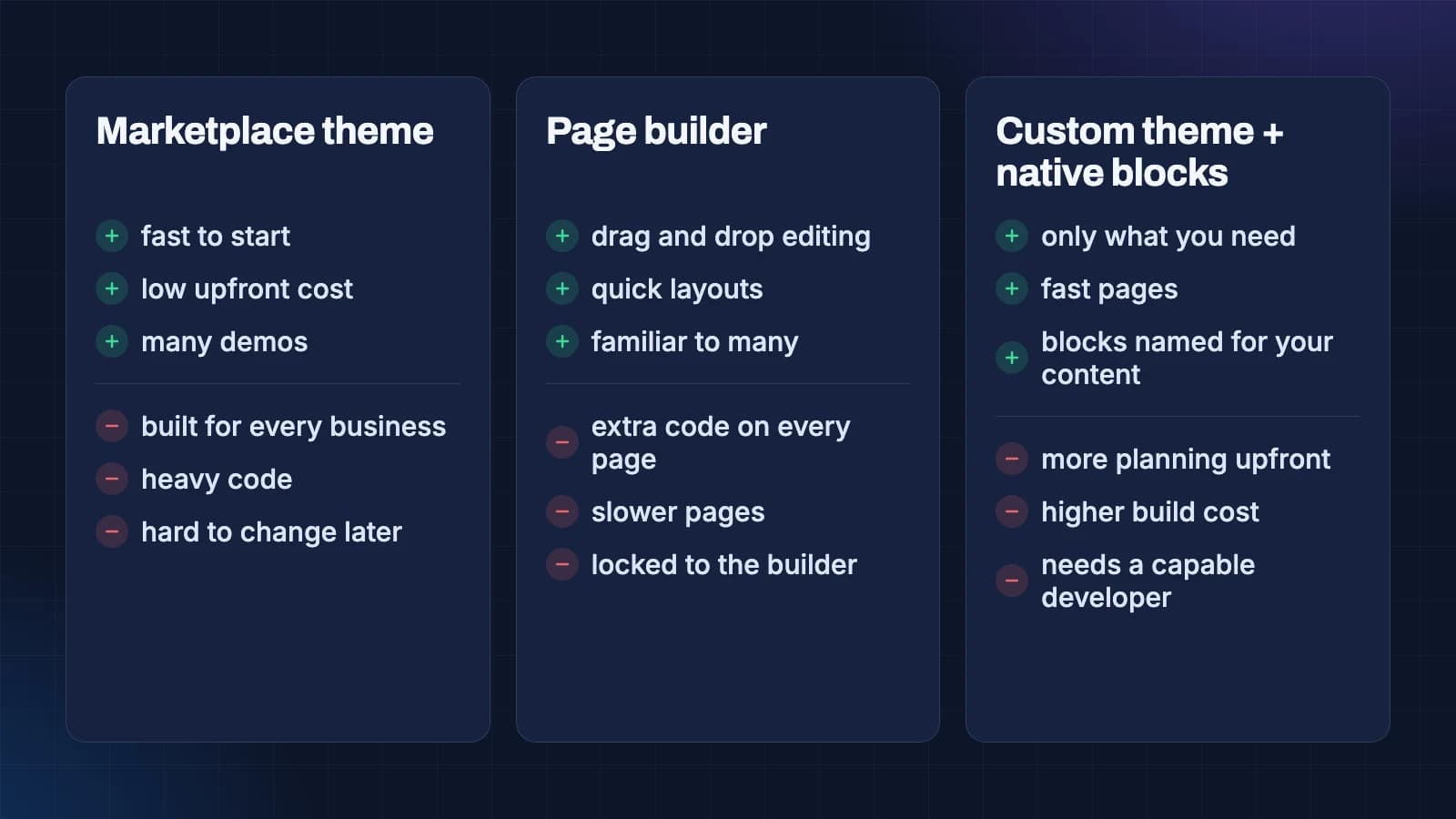
A marketplace theme is a ready-made design bought from a theme store and filled with your content. It is the cheapest and fastest way to get a site that looks finished.
The trouble is that a marketplace theme is built to demo well for every possible business. To do that it carries features, layouts and settings for restaurants, law firms, gyms and photographers all at once. Your site loads code for all of them, and the extra weight shows up as slower pages and more things that can break when the theme updates.
Marketplace themes also make change harder later. Because the design lives inside the theme's settings, moving away from it often means rebuilding the site.
They are not wrong for every project. A small business that needs something presentable quickly, and accepts that it will be replaced in a few years, can do well with one. Just know that is what you are buying.
Approach two: a page builder
A page builder is a plugin that lets you design pages by dragging blocks around on screen. Many WordPress sites today are built this way, because it is quick for the developer and feels flexible for the owner.
The cost comes later. Page builders add their own code to every page, which tends to make pages heavier and slower than they need to be. Your content becomes tied to the builder's own format, so switching away from it means rebuilding pages. And the flexibility cuts both ways: when anyone can drag anything anywhere, a site slowly drifts away from its design as different people edit it.
If you already have a page builder site, it is usually worth asking whether it can be made fast enough before replacing it. Sometimes the answer is yes.
Approach three: a custom theme with native blocks
The third approach is a theme written for your site, using the block editor that is built into WordPress itself. Instead of a general page builder, the developer creates a small set of blocks that match your content: a service summary, a case study card, a pricing table, a team member, a call to action. Each one is named in your language and has only the options it needs.
This takes more planning at the start and usually costs more to build. In return, pages carry only the code they use, the editor is simpler for your team, and the site keeps its shape over time because the blocks guide people towards consistent pages. It is also easier to change later, because the content is stored in WordPress's own format rather than a plugin's.
This is how we build WordPress sites, and it is why our quotes are rarely the cheapest. We describe the approach in more detail on our WordPress development service page.
Which approach is right for you
There is no single right answer, but there is a simple test. Ask how long you expect to keep the site and how much it needs to do.
If the site is temporary, small and rarely changed, a marketplace theme is a fair choice. If your team needs to build many different page layouts quickly and speed is not critical, a page builder can work. If the site is a long-term asset that has to bring in enquiries from search and advertising, and your team will publish on it regularly, a custom theme with native blocks usually costs less over its life, even though it costs more on day one.
Whatever a company recommends, ask them which of the three approaches they are quoting for. If they cannot tell you, that is your answer.
What a good project looks like, step by step
Knowing the steps of a good project helps you spot a weak one. Here is the sequence we follow on our own WordPress builds. Other good companies use different names, but the order matters more than the labels.
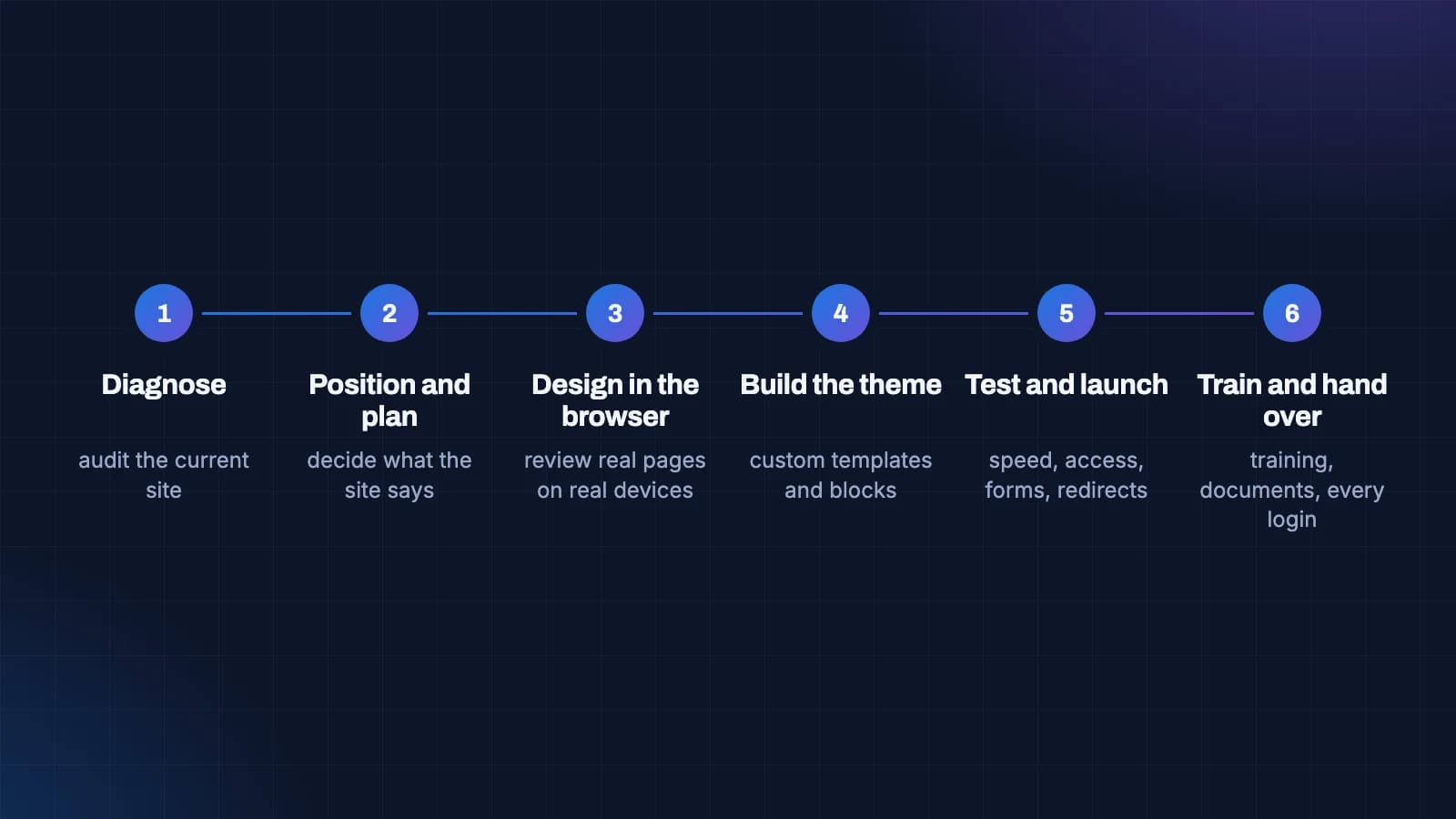
1. Diagnose
If you have an existing site, the project starts by auditing it: which plugins it runs and why, how the theme is built, how fast it is on a phone, how secure it looks from the outside, which pages bring visitors from search, and what your editors actually struggle with day to day. Without this step, a rebuild repeats the old site's mistakes with new colours.
2. Position and plan
Next comes deciding what the site has to say and what kinds of content it needs. This step decides which blocks will exist, so it has to come before design. It is also where search demand is checked: what people actually type when they look for what you sell, and which pages could answer those searches.
3. Design in the browser
Good teams now design pages as real pages in a browser rather than as flat pictures. You review them on your own phone and laptop. What you approve is what gets built, and surprises about how something behaves on a small screen show up early instead of the week before launch.
4. Build the theme
The theme and blocks are written to the WordPress coding standards, with only the plugins the site genuinely needs. Search settings, structured data and a speed budget are built in as the pages are built, not added at the end.
5. Test and launch
Before the switch: speed on a mid-range phone, accessibility checks, every form tested end to end, and a redirect for every old address so that links and search rankings carry across. Backups and an update routine are set up before launch day, not after the first problem.
6. Train and hand over
Your team is trained on the blocks that were built for them, you receive written documentation, and every account is in your name. More on that below, because it is the part most often skipped.
A company that skips the first two steps and starts with design is not necessarily a bad company, but it is guessing. Ask to see how they handle diagnosis and planning on a past project.
The eight questions to ask before you hire
These questions take ten minutes in a first meeting, and the answers tell you more than any portfolio. A careful company will be glad you asked. A careless one will become vague.
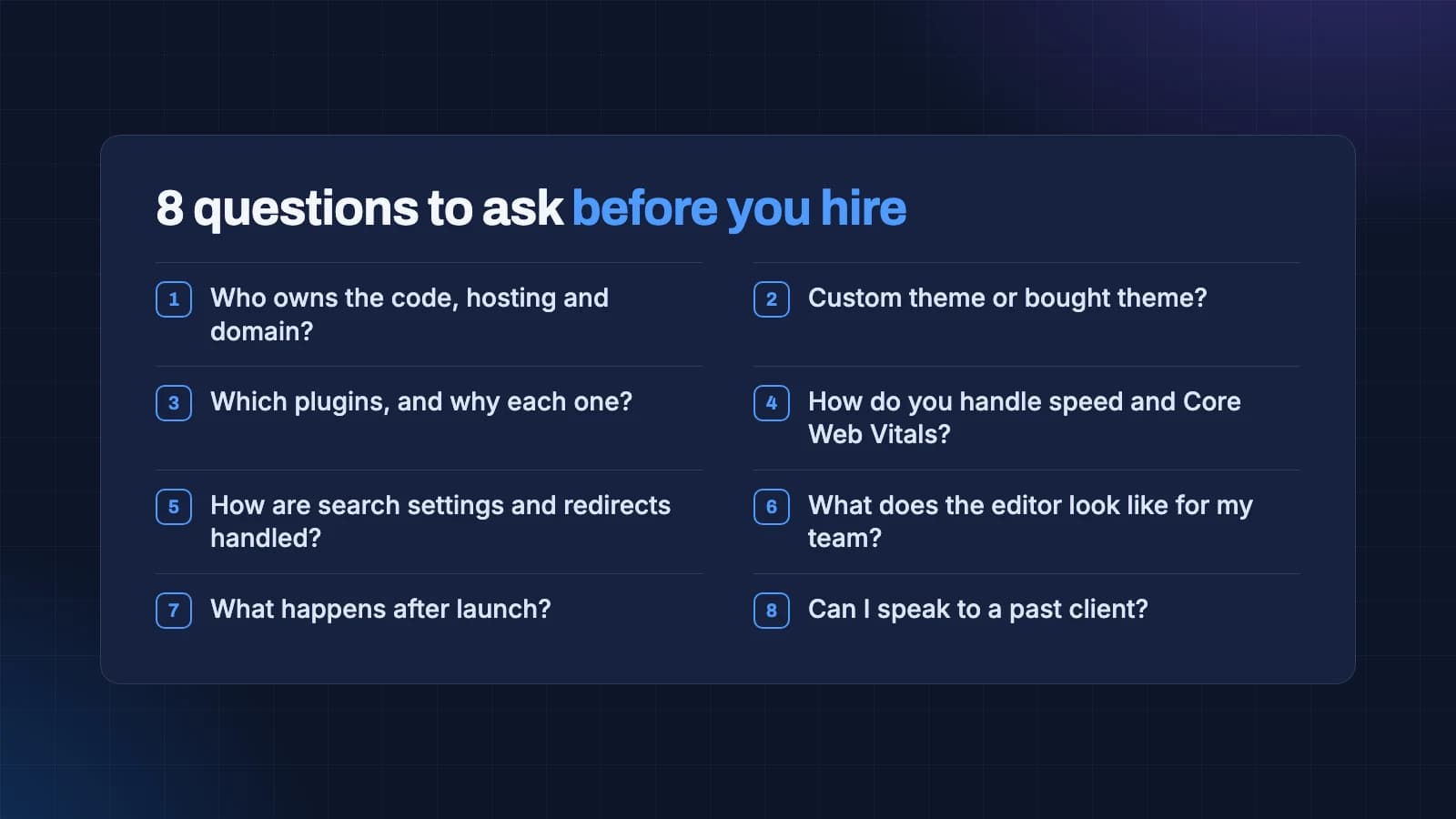
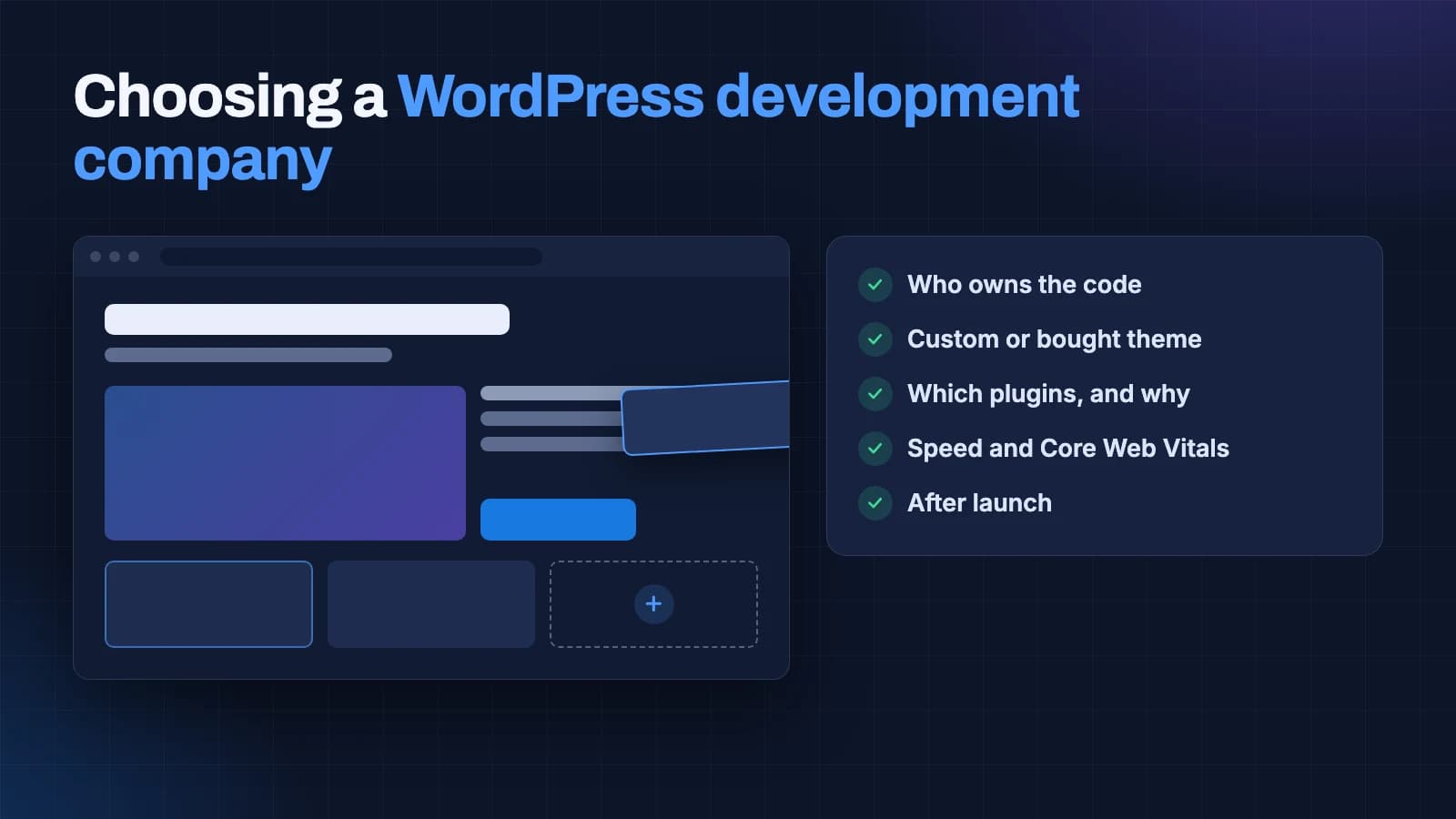
1. Who will own the code, the hosting and the domain?
The only good answer is: you will, in your own name, from the start. Some companies register domains and hosting in their own accounts "to make it easier". It does make things easier, for them. If the relationship ends badly, you may find you cannot move your own site.
2. Will you build a custom theme or use a bought one?
Neither answer is automatically wrong, but you should know which you are paying for, and the price should match. A custom theme quoted at a marketplace theme price is a warning sign that one of the two is not true.
3. Which plugins will the site use, and why each one?
A good company can name the plugins it expects to use and give a reason for each. Every plugin is code someone else wrote, which you will need to update for as long as the site exists. Fewer, well-chosen plugins mean fewer things that can break and fewer security updates to worry about.
4. How will you handle speed?
Ask how they measure it and what target they set. Google publishes clear thresholds for what it considers a good experience, known as Core Web Vitals. A company that knows them by heart, and tests on a mid-range phone rather than a fast laptop, takes speed seriously.
5. How are search settings and redirects handled?
If you have an existing site, ask how they will protect the pages that already rank. The answer should include a list of every old address and where it will point, checked before launch. We wrote about this in detail in SEO for a website redesign.
6. What will the editor look like for my team?
Ask to see the editing screen of a site they built. Is it simple enough that your marketing person could publish a new service page without help? Are the blocks named in plain language? This is the part of the site your team will live with every day.
7. What happens after launch?
Some sites need ongoing care: updates, backups, security monitoring, small changes. Ask what is included in the build, what is optional and what it costs. You should be free to choose another company for maintenance, or to do it yourself.
8. Can I speak to a past client?
Portfolios show what a site looks like. A past client can tell you what the project was like: whether deadlines held, whether surprises appeared on the invoice, whether the site still works well a year later. If a company has no client willing to take a five-minute call, ask yourself why.
What you should own when the project ends
Ownership sounds like a legal detail, but it is the difference between a website you control and one you rent from your developer. When the project ends, you should hold all of the following, each in your own name or your company's name.
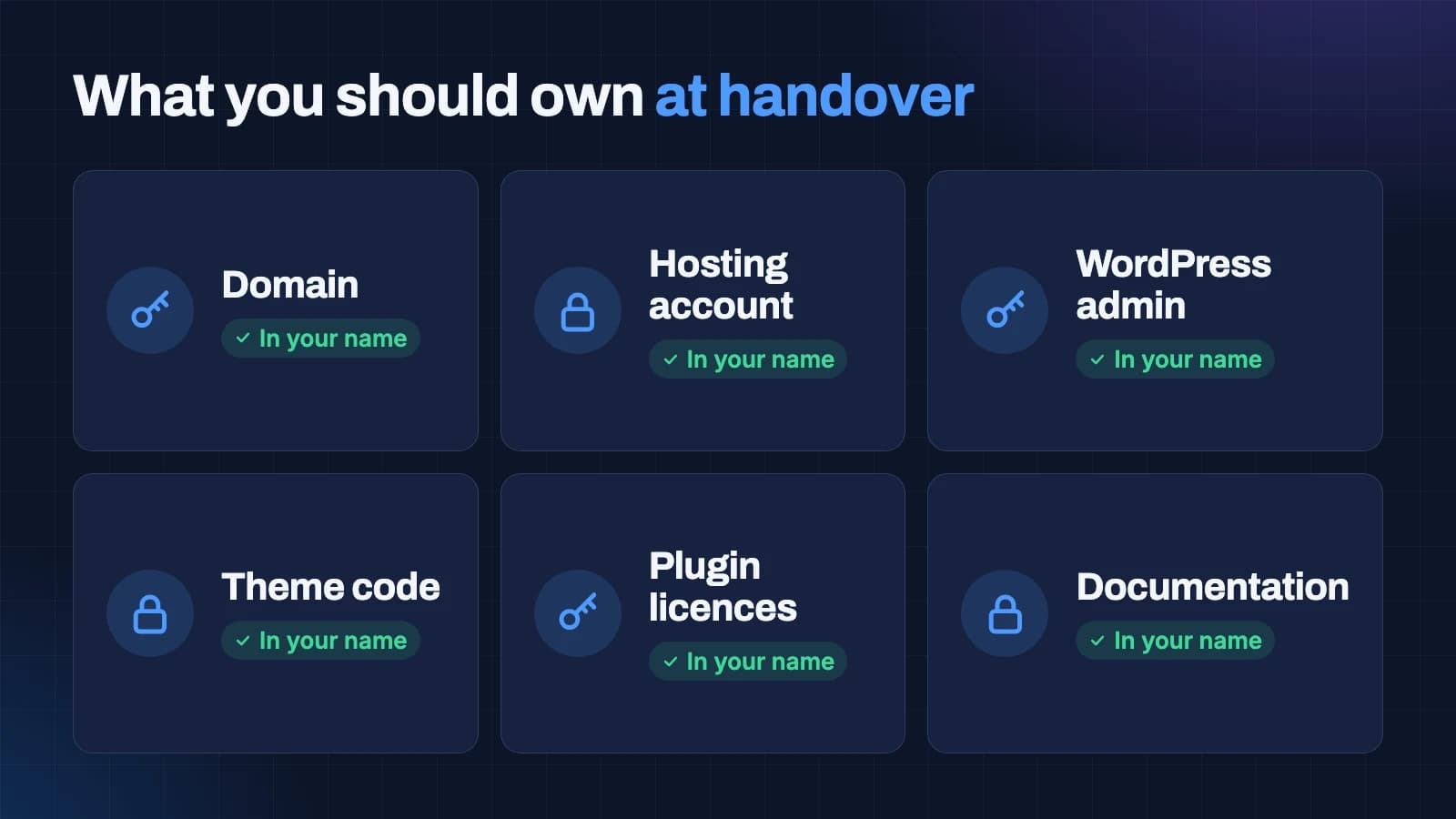
- The domain name. Registered to your business, with the login in your hands. It is your address on the internet, and losing it can mean losing your email as well.
- The hosting account. In your name, paid by you. Your developer can have their own access, but the account is yours.
- The WordPress administrator login. You should have the highest level of access, not just an editor account.
- The theme code. If you paid for a custom theme, you should receive the files and the right to use and change them, ideally in a code repository you can access.
- Plugin licences. Paid plugins should be licensed to you, so updates keep working if you change developers.
- Documentation. A written guide to how the site is built, which blocks exist, how to add common types of content, and what to do in the most likely emergencies.
Ask for this list in writing before you sign, and check it off at handover. It costs a company nothing to agree to it, and the ones who resist are telling you something.
Five questions to answer before you talk to anyone
Companies give better quotes, and you get more useful conversations, when you have answered a few questions for yourself first. They take an hour, and they will save you several.
- What should the website do for the business? Bring enquiries from search, support sales conversations, recruit staff, sell products, or simply prove you exist. Pick the one that matters most.
- Who is it for? Describe the person you most want to reach in two sentences: what they do, what they worry about, and what would make them pick up the phone.
- What already works? If you have a site, which pages bring visitors or enquiries today? Your analytics or Search Console will show this, and a good company will ask.
- Who will run it day to day? Name the person who will publish and edit. Their comfort with technology should shape the editor you ask for.
- What is the budget range, and the deadline that really matters? A range lets a company recommend the right approach instead of guessing. A real deadline, such as a launch or an event, is more useful than "as soon as possible".
Write the answers on one page and send it to every company you speak to. The quality of their replies is your first real test.
How much a WordPress website costs
Prices vary widely, and the variation is mostly explained by the three build approaches above, the number of distinct page types, and how much planning and research the company does before building.
As a reference point, our own published WordPress packages start at ₹15,000 for a focused landing page or portfolio, with packages at ₹25,000 and ₹35,000 for larger sites. You can see what each includes on our WordPress development page. Other companies will price differently, and that is fine, but you should be able to see clearly what is included at each level.
When comparing quotes, line them up against the same list:
- Which build approach is being quoted: marketplace theme, page builder or custom theme.
- How many page templates are included, not just how many pages. Ten pages built from two templates is a very different job from ten pages built from ten.
- Whether planning, search research and content guidance are included or assumed to come from you.
- Whether redirects from an old site are included.
- What is included after launch, and what costs extra.
- Who pays for hosting, the domain and any paid plugins, and in whose name they are registered.
A cheap quote is not a bad quote in itself. A cheap quote that is vague about these points usually becomes an expensive project.
Red flags that should end the conversation
Most bad WordPress projects were visible as bad projects before they started. These are the warning signs we see most often when owners come to us after a difficult experience elsewhere.
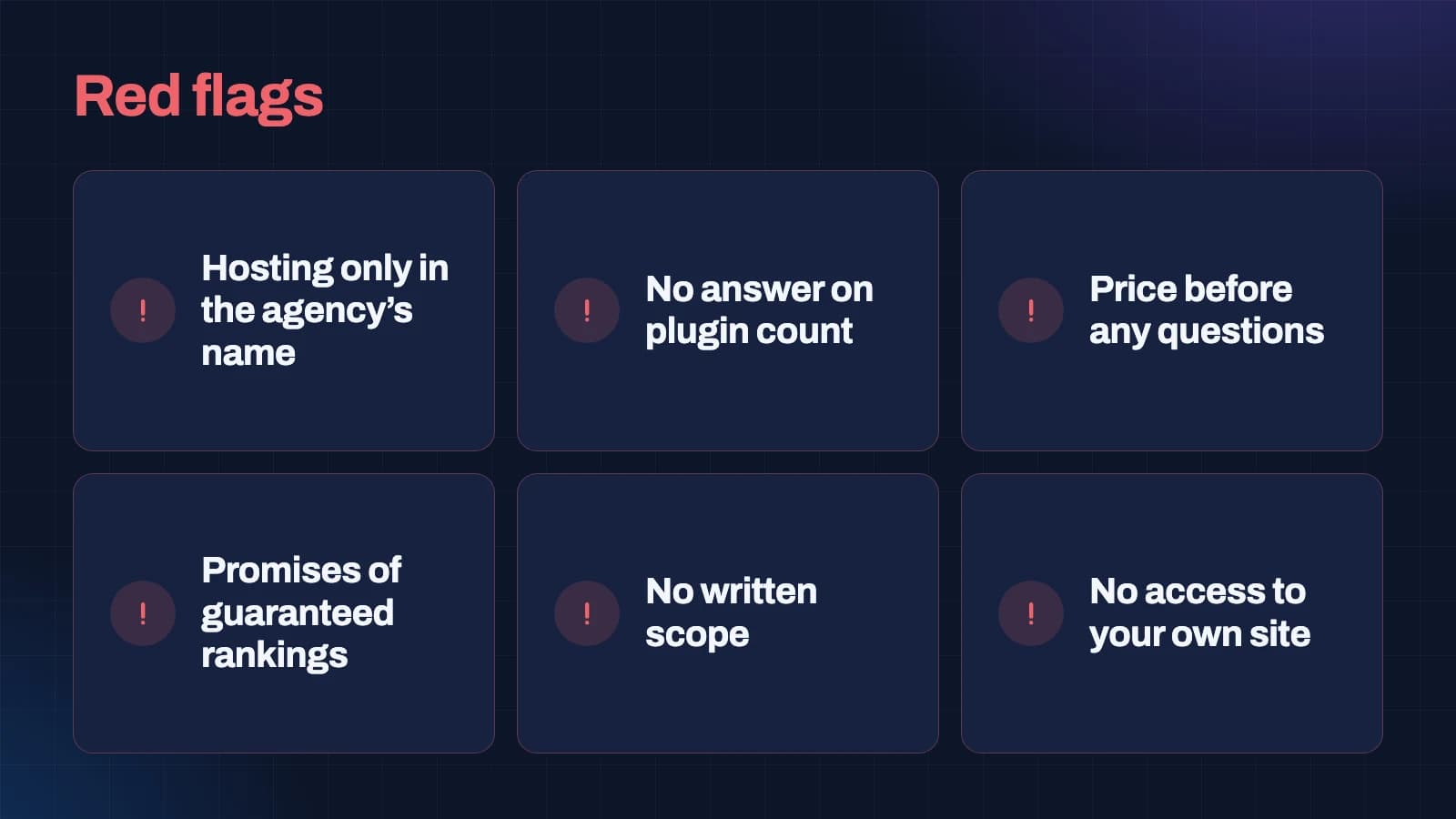
Hosting or domain only in the agency's name
There is no good reason for this. You can give a company access to your accounts without giving them ownership.
No clear answer on plugins
If a company cannot tell you roughly which plugins it will use, it has not thought about the build yet, or it plans to solve each problem by adding another plugin.
A price before any questions
A company that quotes a full price before asking about your business, your customers and your existing site is quoting for a template, whatever it calls it.
Promises of guaranteed rankings or leads
No honest company can guarantee a position on Google, a number of leads or an amount of revenue. Search engines, competitors and buyers all behave in ways nobody controls. What a company can promise is a site built correctly, with the foundations search engines need, and honest measurement afterwards.
No written scope
If the agreement is a quote with a single total, you will discover what is not included one invoice at a time. Ask for a written list of pages, templates, features and what happens after launch.
No access to your own site during the project
You should be able to see work in progress on a staging address, and you should be given access to it. A company that only shows you screenshots until the last week is asking you to trust rather than check.
Repair or rebuild? Deciding what your existing site needs
If you already have a WordPress site that is slow or hard to manage, the first question is not which company to hire for a rebuild. It is whether you need a rebuild at all.
A repair is usually enough when the design still suits the business and the main problems are speed, too many plugins or an outdated setup. Removing unused plugins, replacing a heavy page builder on the most important pages, fixing image handling and moving to better hosting can transform a site at a fraction of the cost of rebuilding it.
A rebuild makes sense when the site no longer says what the business does, when the structure fights the content you want to publish, or when the theme or builder is so tangled that every change breaks something else. It also makes sense when the business has changed enough that the old site's pages no longer match what you sell.
A good company will audit before recommending either. If the first meeting ends with a rebuild quote and no audit, ask for the audit first. We do this as a matter of course, and we have told owners more than once that their site needed a few days of repair rather than a new build.
You can see real examples of what changed in rebuilds we have done on our before and after page, with the old and new sites side by side.
Speed, Core Web Vitals and why they matter to a buyer
Speed is easy to wave away as a technical detail. It is not. A slow page loses visitors before they read a word, and Google uses page experience as one of many signals when deciding what to show.
Google measures a page's experience with three numbers, called Core Web Vitals, and publishes what it considers good for each:
- Largest Contentful Paint (LCP): how long the main content takes to appear. Good is 2.5 seconds or less.
- Interaction to Next Paint (INP): how quickly the page responds when someone taps or clicks. Good is 200 milliseconds or less.
- Cumulative Layout Shift (CLS): how much the page jumps around while it loads. Good is 0.1 or less.
You do not need to understand how these are measured to use them in a buying decision. Ask any company you are considering to show you these numbers for a site they built recently, measured on a phone. If they cannot, or the numbers miss the thresholds, you have learned how they prioritise speed.
The build approach matters here too. Marketplace themes and page builders can be made fast, but it takes extra effort to remove what they add. A custom theme starts light and has to be kept that way.
Search, AI answers and what to expect honestly
Many owners hire a WordPress company partly to be found on Google, and increasingly in AI answers from tools like ChatGPT and Google's AI Overviews. It is worth being clear about what a build can and cannot do.
A well-built site gives search engines and AI systems what they need to understand it: clear pages that each answer one question, sensible headings, structured data describing your business and services, fast pages, and a clean structure of links between them. Those foundations are the developer's job, and they should be in place on day one.
What a build cannot do on its own is guarantee visibility. Rankings depend on how many other businesses compete for the same searches, how useful and trustworthy your content is compared with theirs, and how other sites refer to you. That is ongoing work, not a launch-day event. We explain the newer side of this in our guides to answer engine optimisation and generative engine optimisation.
So the right expectation from a WordPress development company is a site built correctly for search, plus honest advice about what will move results afterwards. Anyone promising more is guessing, or selling.
Content: the part nobody budgets for
The most common reason WordPress projects run late is not the developer. It is content. Pages need words, photos, case studies and service descriptions, and someone has to produce them.
Before you hire, decide who will write what. Some companies include copywriting, some offer it as an extra, and some assume you will supply everything. None of these is wrong, but the assumption needs to be stated.
If your team is writing, a good company will give you a structure for each page: what it needs to say, roughly how long, and what evidence to include. That turns a blank page into a short list of questions, and it keeps the content consistent with the design.
It also helps to start gathering material early. Photos of your team and work, details of past projects, the questions customers ask most often, and a clear list of services with a sentence on each will save weeks.
Working with a company outside your city
Many owners prefer a local company, and for some projects that matters: a business that wants to meet in person every week, for example. For most WordPress projects, though, location matters less than process. The work happens in a browser, reviews happen on a video call with a shared screen, and good communication is a habit rather than a matter of distance.
What does matter is time zones, language and responsiveness. Ask when the team is available, how quickly they reply, and who your single point of contact will be. A named person who knows your project is worth more than a nearby office.
We are based in Chennai and work with businesses across India, the UAE and the USA. Most of our projects never involve an in-person meeting, and none of them suffer for it.
After launch: maintenance without dependence
A WordPress site needs some care for as long as it exists. WordPress itself, the theme and every plugin receive updates, some of them for security. Backups need to run and be tested. Forms need checking now and then to make sure enquiries still arrive.
There are three sensible ways to handle this:
- Your team does it, using the documentation from the handover. This works when you have someone comfortable with the admin area and the site has few plugins.
- Your original developer does it on a monthly arrangement with a clear list of what is included.
- Another company does it. Because you own everything, you are free to choose.
What matters is that the choice is yours. If the only company that can maintain your site is the one that built it, you are not buying maintenance, you are buying dependence.
How to read a WordPress portfolio properly
Every company shows its best screenshots. A portfolio is still useful, as long as you look at it the way a careful buyer would rather than the way it was designed to be looked at.
First, open the live sites, not the pictures. A screenshot shows a design on a large screen at its best moment. The live site shows how it loads on your phone, how the menu behaves, whether the text is readable and whether the forms work. Open three or four on your own phone over mobile data and notice how long you wait.
Second, look for range. If every site in the portfolio looks the same, with the same layouts and the same sections in the same order, the company is probably reusing one theme with different colours. That is not always bad, but it tells you how much of your site will be designed for you.
Third, check how old the work is. A portfolio full of sites from several years ago may mean the company has stopped doing this kind of work, or that its recent clients did not want to be shown. Ask which projects are from the last year.
Fourth, look at sites similar to yours. A beautiful restaurant site does not prove a company can build a clear, credible site for a law firm or a manufacturer. Ask for examples in your type of business, or at least with your kind of buyer.
Finally, use the portfolio to start a conversation. Pick one site and ask what the brief was, what was hard about it, and what they would do differently now. A company that can answer those questions in detail did the thinking. A company that can only describe the colours did the decoration.
Security basics to ask about
WordPress has a reputation for security problems, and most of it comes from sites that were set up carelessly and then left alone. A well-built, well-maintained WordPress site is not a high-risk choice. But security is part of the build, not something to bolt on later, so ask about it.
The basics are simple. Every account should have a strong, unique password and, for administrators, two-step login. Only people who need administrator access should have it; everyone else should have an editor or author account. The site should run on current versions of WordPress and PHP. Plugins and themes should come from reputable sources and be kept up to date. Login pages should be protected against repeated guessing. Forms should be protected against spam without making real people solve puzzles. And there should be automatic backups stored somewhere other than the website's own server, with a tested way to restore them.
You do not need to check each of these yourself. You do need to hear the company describe them without hesitation. If the answer to "how do you handle security" is a single plugin name, ask what else they do.
Accessibility: building for every visitor
An accessible website is one that people can use whatever their abilities and whatever device they use. That includes people who navigate with a keyboard rather than a mouse, people using screen readers, people with low vision who zoom the page, and people reading on a small phone in bright sunlight.
The international standard for this is the Web Content Accessibility Guidelines, known as WCAG. Ask a company which level they build to. A sensible target for most business sites is WCAG 2.2 at level AA, which covers things like readable colour contrast, text alternatives for images, forms with proper labels, a visible focus outline when navigating by keyboard, and content that works when zoomed.
Accessibility is also good business. The same changes that help a screen reader user tend to help everyone: clearer headings, readable text, buttons that say what they do, and forms that explain mistakes. And search engines read pages in a way that has a lot in common with assistive technology, so an accessible page is usually easier for them to understand as well.
How long a WordPress project should take
Timelines depend on the size of the site and, very often, on how quickly content arrives. As a rough guide from our own work, a focused site of a few pages can be built in days once the content is ready, while a new business website of ten to twelve pages with custom templates usually takes four to eight weeks from the first planning meeting to launch. Repairing a slow or tangled existing site often takes two to four weeks.
Be wary of timelines that sound too good. A full custom site promised in a week usually means the planning and testing steps are being skipped. Be equally wary of a project with no dates at all. A good company gives you a schedule with clear points where you review and approve work, and tells you what it needs from you and by when.
The single biggest cause of delay is content waiting on the client side, so agree on who is writing what, and when, before the project starts.
A one-page checklist to take into your next meeting
If you remember nothing else from this guide, take this list into the room:
- Ask which of the three build approaches is being quoted.
- Ask for the expected plugin list with a reason for each.
- Ask for Core Web Vitals results from a recent site, measured on a phone.
- Ask how redirects from your old site will be handled.
- Ask to see the editor of a site they built.
- Ask for a written scope listing templates, features and what happens after launch.
- Ask for the ownership list in writing: domain, hosting, admin, theme code, licences, documentation.
- Ask to speak to a past client.
- Walk away from guaranteed rankings, quotes without questions and accounts held in the agency's name.
How we can help
If you would like a second opinion on a quote you have received, or an honest view on whether your existing WordPress site needs repair or rebuilding, we are happy to look. We will tell you what we would do first and what it would cost, and if a simpler option suits you better, we will say so.
You can see the kind of work we do in our portfolio and before and after pages, read about our approach on the WordPress development page, or get in touch to talk it through.
Questions people ask about this
What does a WordPress development company do?
It plans, designs and builds a WordPress website around your business: deciding what the site needs to say, building a theme and content blocks, setting up search foundations and speed, protecting rankings from an old site, and handing over a site your team can run, with every account in your name.
How much does a WordPress website cost in India?
It depends mainly on the build approach, the number of distinct page templates and how much planning is included. As one reference, our published packages start at ₹15,000 for a focused landing page or portfolio, with larger sites at ₹25,000 and ₹35,000. Compare quotes on the same list of inclusions rather than on the total alone.
Is a custom theme better than a page builder?
For a long-term business site that needs to be fast and easy to edit, usually yes: a custom theme with native blocks carries only the code it needs and keeps pages consistent. A page builder is quicker to start with and can suit sites where speed matters less. A marketplace theme suits small sites that will be replaced within a few years.
Can a WordPress company guarantee first-page rankings?
No. Rankings depend on competition, content quality and how other sites refer to you, none of which a developer controls. A good company builds the technical foundations correctly and measures results honestly afterwards. Treat any guarantee as a warning sign.
What should I own after my website is built?
The domain, the hosting account, the WordPress administrator login, the theme code, any paid plugin licences and written documentation, all in your business's name.
Should I repair my existing WordPress site or rebuild it?
Repair it if the design still suits the business and the problems are speed, plugins or setup. Rebuild if the site no longer says what the business does or its structure fights the content you need. Ask for an audit before accepting either recommendation.

Mohammed Imran M
Founder & Director · LinkedIn
Started the firm on one rule: understand the business before recommending what it should buy.
Start a conversation