Tech ConversionInsights14 October 202627 min
Custom web development vs website builders and templates: cost, speed and when each pays off
An honest comparison of website builders, templates, WordPress with a custom theme and fully custom development: what each really costs over time, how fast each can be, and a simple way to decide which one your business needs.
WordsManvika Sohal
Every business that needs a website eventually faces the same choice. Do you use a website builder and do it yourself, buy a template and have someone fill it in, or pay for custom web development? The prices on offer can differ by a factor of ten or more, and the people selling each option are all quite sure theirs is the right one.
The truth is less exciting and more useful. Each option is the right answer for some businesses and the wrong answer for others, and the difference comes down to a few questions about what your website has to do, how long you will keep it, and who will look after it.
This guide works through those questions. It explains the four main ways a business website gets built, what each one really costs over its life rather than on day one, how fast each can be, where each one breaks down, and a simple decision path you can follow. It ends with a practical checklist for the conversation with whoever you hire.
We build both custom websites and WordPress sites, and we also tell owners when a website builder is enough. So we have no reason to push you towards the most expensive option, and every reason to help you avoid the wrong one.
The four ways a business website gets built
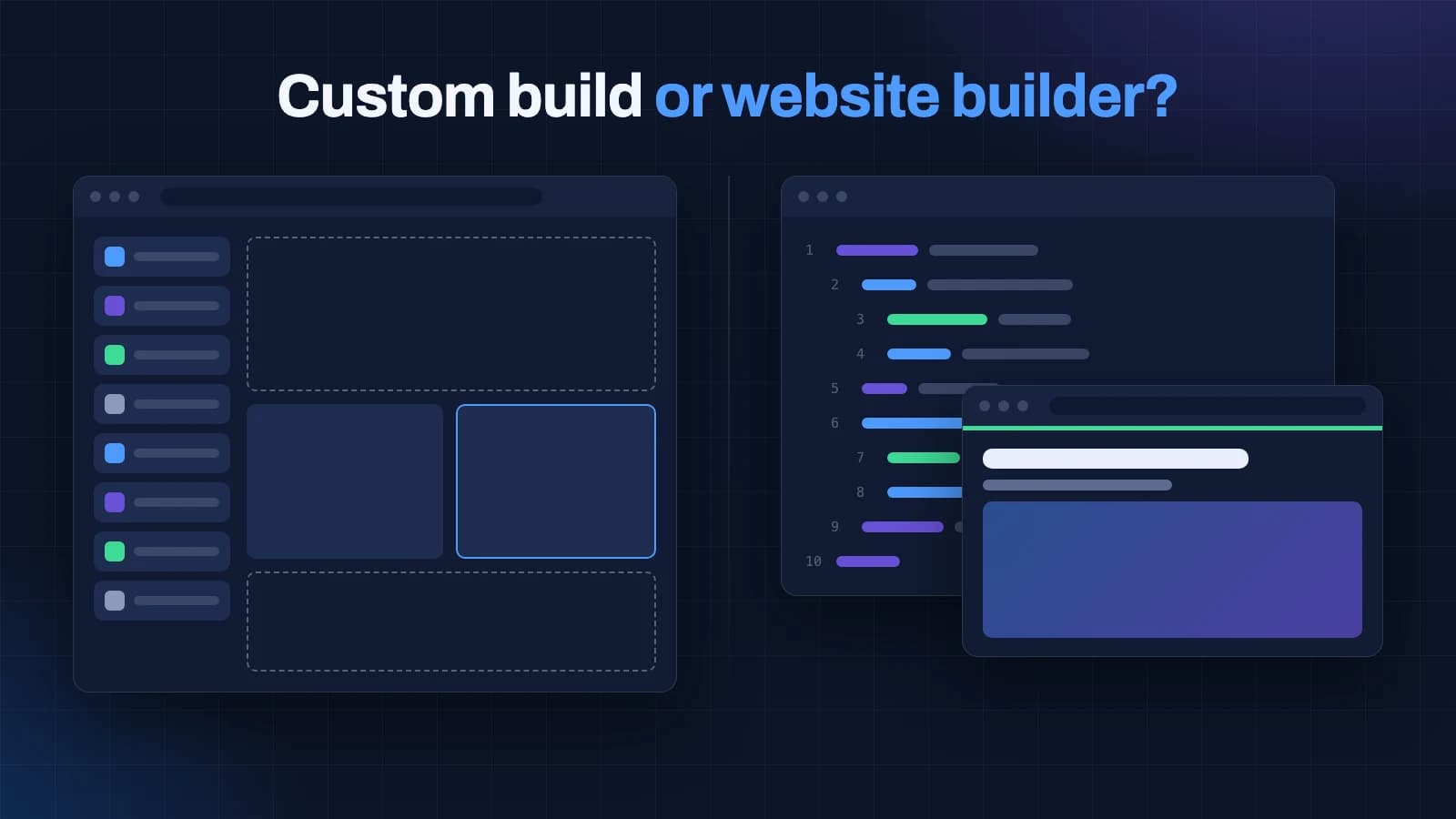
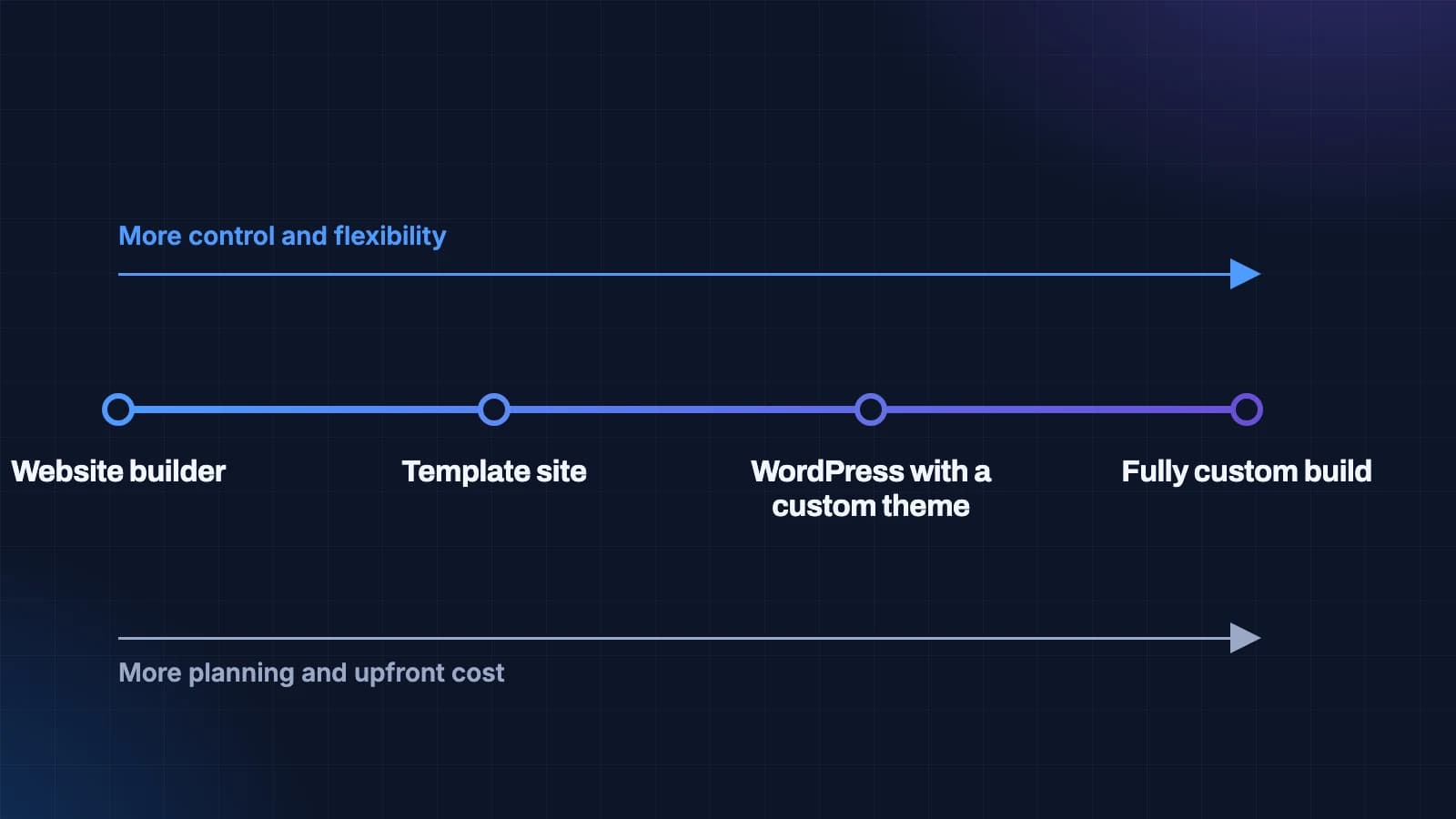
It helps to stop thinking of this as a two-way choice between "cheap builder" and "expensive custom". There are four common options, and they sit along a line from the most convenient to the most controllable.
1. A website builder
A website builder is an online service where you pick a design, drag in your content and publish, all inside the builder's own system. You pay a monthly or yearly subscription, and the builder handles hosting, security and updates.
Builders are genuinely good at what they are for. They are quick, they need no technical knowledge, and for a small site that rarely changes they can be all a business needs. The trade-off is control: you work within the builder's options, your site lives on their platform, and moving away later usually means rebuilding from scratch.
2. A template site
A template site starts from a ready-made design, often on WordPress or a similar system, which a freelancer or agency fills with your content and adjusts. It is usually cheaper than custom work and faster to launch.
Templates carry the same trade-off as marketplace themes in general: they are built to suit many businesses at once, so they include features and code you do not need, and changing the structure later can be harder than it looks.
3. WordPress with a custom theme
This is the middle path. The site runs on WordPress, which gives your team a familiar editor and a large pool of developers, but the design and the content blocks are written for your business rather than borrowed from a theme. Pages carry only what they use, and the editor is shaped around your content.
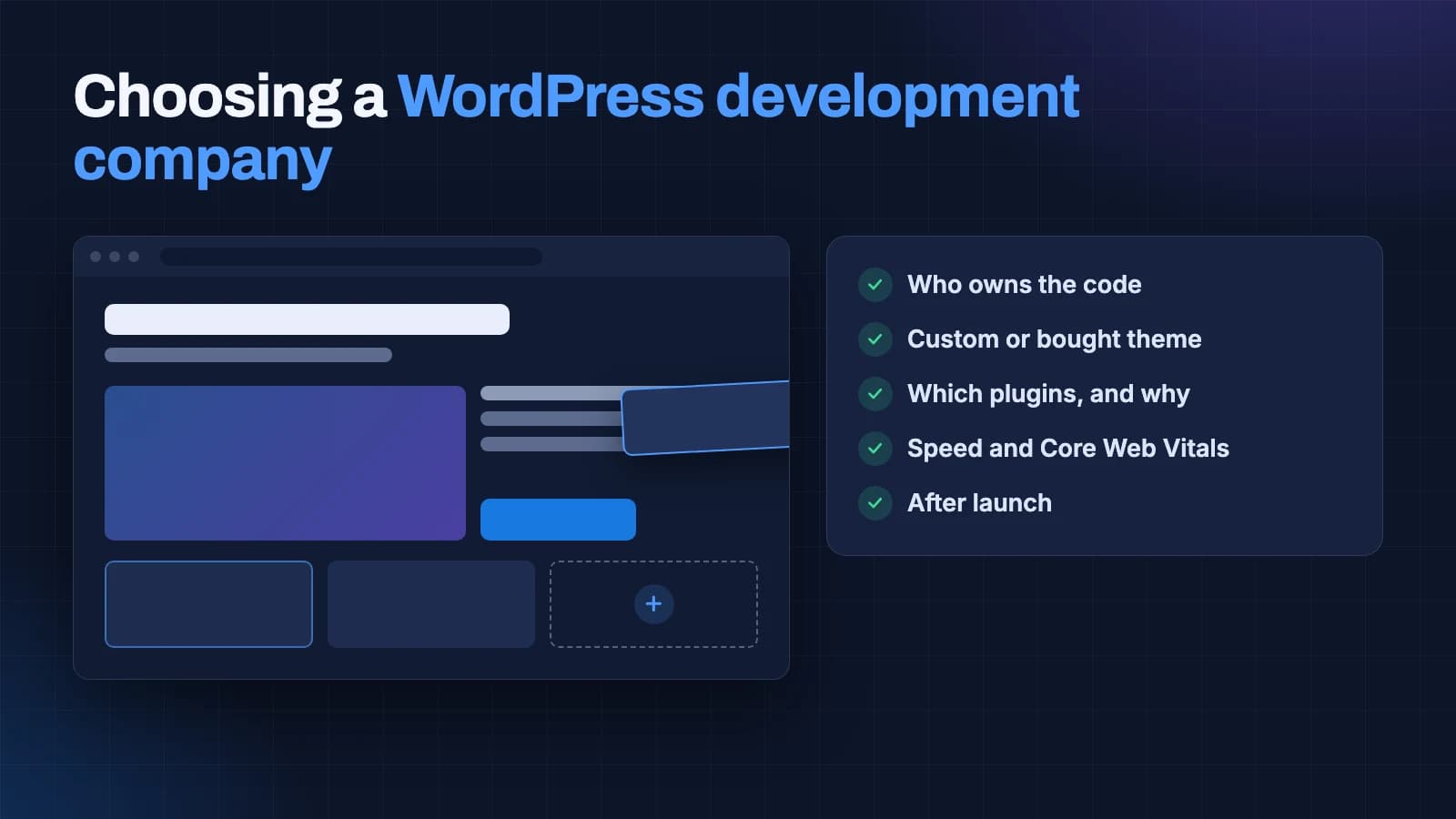
For many businesses whose main job online is to publish content and bring in enquiries, this is the sweet spot. We explain this approach in depth in our guide to choosing a WordPress development company.
4. A fully custom build
A fully custom website is written for your business from the ground up, using a modern web framework rather than a content management system built for blogs. The developer controls every line of code, from how pages load to how data is stored and connected to your other systems.
This is the most flexible and, done well, the fastest option. It is also the one that needs the most planning and the most capable team. It makes the most sense when the website is not just a brochure but a working part of the business: a customer portal, a booking system with real rules, a product catalogue tied to inventory, or a site that has to connect to a CRM, an ERP or other software.
The website you are reading this on is a custom build, for exactly those reasons: it publishes articles, runs a dashboard for our team, connects to our lead management, and has to stay fast on a phone.
What each option really costs over time
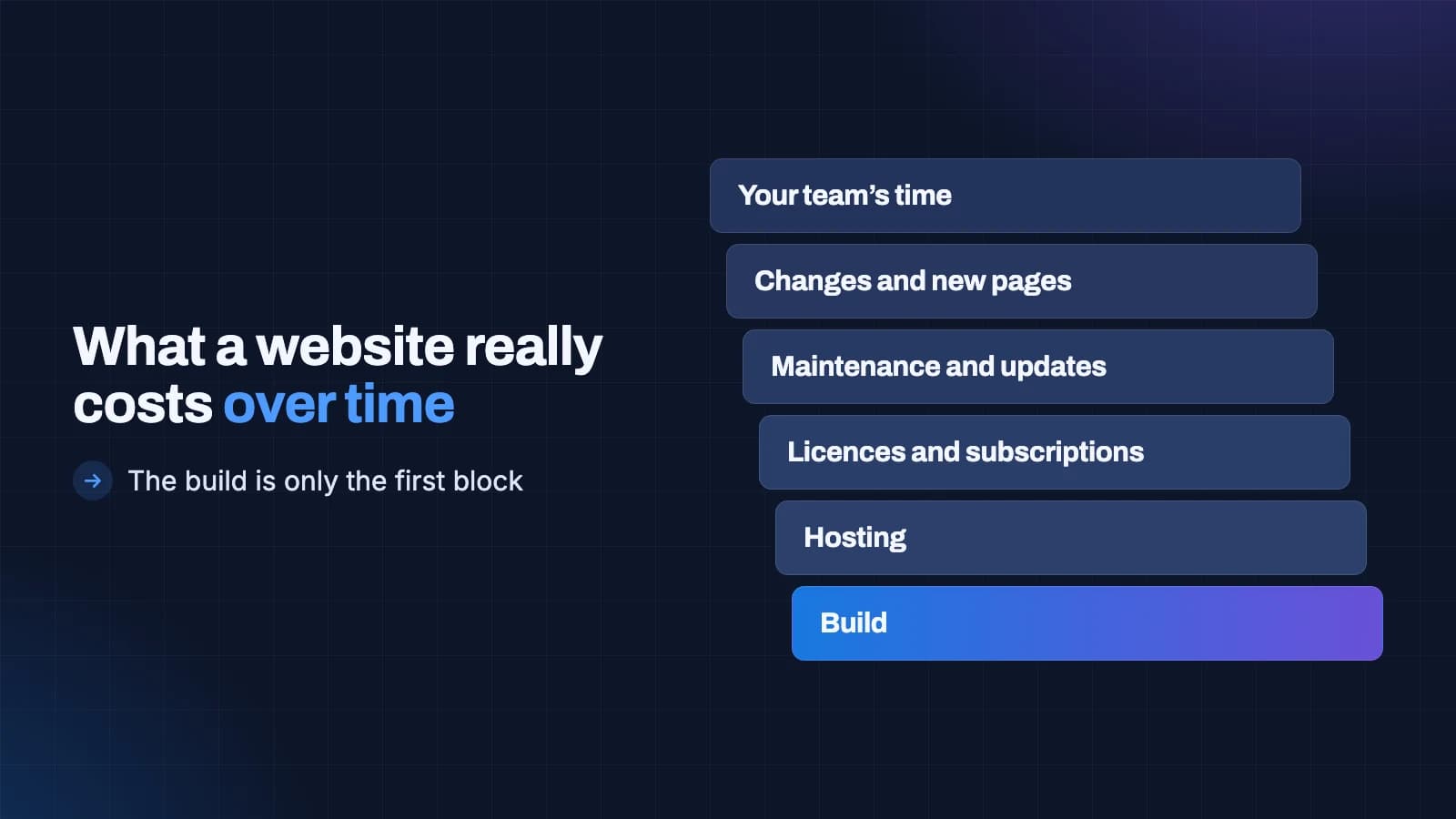
The price you are quoted is the cost of the first block. Over three to five years, a website costs much more than its build, and the options differ a great deal in where those costs fall.
The cost blocks every website has
Whichever option you choose, the total cost of a website over its life is made of the same pieces:
- The build: planning, design, development, content and testing before launch.
- Hosting: where the site lives. Included in a builder's subscription; a separate bill for the other three options.
- Licences and subscriptions: builder plans, paid themes, paid plugins, form tools, booking tools and anything else charged monthly or yearly.
- Maintenance and updates: keeping software current and secure, fixing what breaks, checking backups.
- Changes and new pages: the work of adding services, campaigns, landing pages and new features as the business grows.
- Your team's time: the hours someone spends working around the site's limits, waiting for changes, or fixing problems.
That last block is the one owners almost never count, and it is often the biggest. A site that is cheap to build but slow to change can quietly cost more in staff time than a better build would have cost in the first place.
How the options compare
A website builder has the lowest build cost, often your own time, and a steady subscription that never ends. Licence costs grow as you add premium features. Maintenance is mostly handled for you. Changes are easy within the builder's limits and impossible beyond them.
A template site has a low build cost, modest hosting, and licence costs for the theme and any premium plugins. Maintenance is real, because templates and their plugins need regular updates. Changes are cheap when they fit the template and expensive when they do not.
WordPress with a custom theme has a higher build cost, modest hosting, and usually fewer licences because there are fewer plugins. Maintenance is lighter than a template site for the same reason. Changes within the blocks are easy for your team; new kinds of page need a developer.
A fully custom build has the highest build cost, hosting that varies with what the site does, and very few licences. Maintenance depends on how the site was built and documented. New features cost developer time, but there is no ceiling on what can be added, and nothing has to be worked around.
A worked way to compare quotes
Rather than comparing build prices alone, write down a three-year view for each option you are considering:
- The build quote.
- Three years of hosting.
- Three years of every licence and subscription, including the ones you would add as the site grows.
- A realistic maintenance figure, either a monthly plan or an estimate of hours.
- The changes you already know you will want in the next three years, priced for that option.
- An honest guess at the extra staff hours each option would cost or save.
You will often find the gap between options shrinks, and sometimes reverses, once the whole picture is on the page.
For reference, our own published packages for WordPress sites start at ₹15,000, with larger sites at ₹25,000 and ₹35,000. Custom builds are scoped individually because they vary so much. You can see what is included on our custom websites and WordPress development pages.
Speed: what fast means and which options deliver it
Website speed is not a matter of taste. A slow page loses visitors before they read anything, and Google uses page experience as one of its many signals. Google also publishes exactly what it considers a good experience, through three measurements called Core Web Vitals.
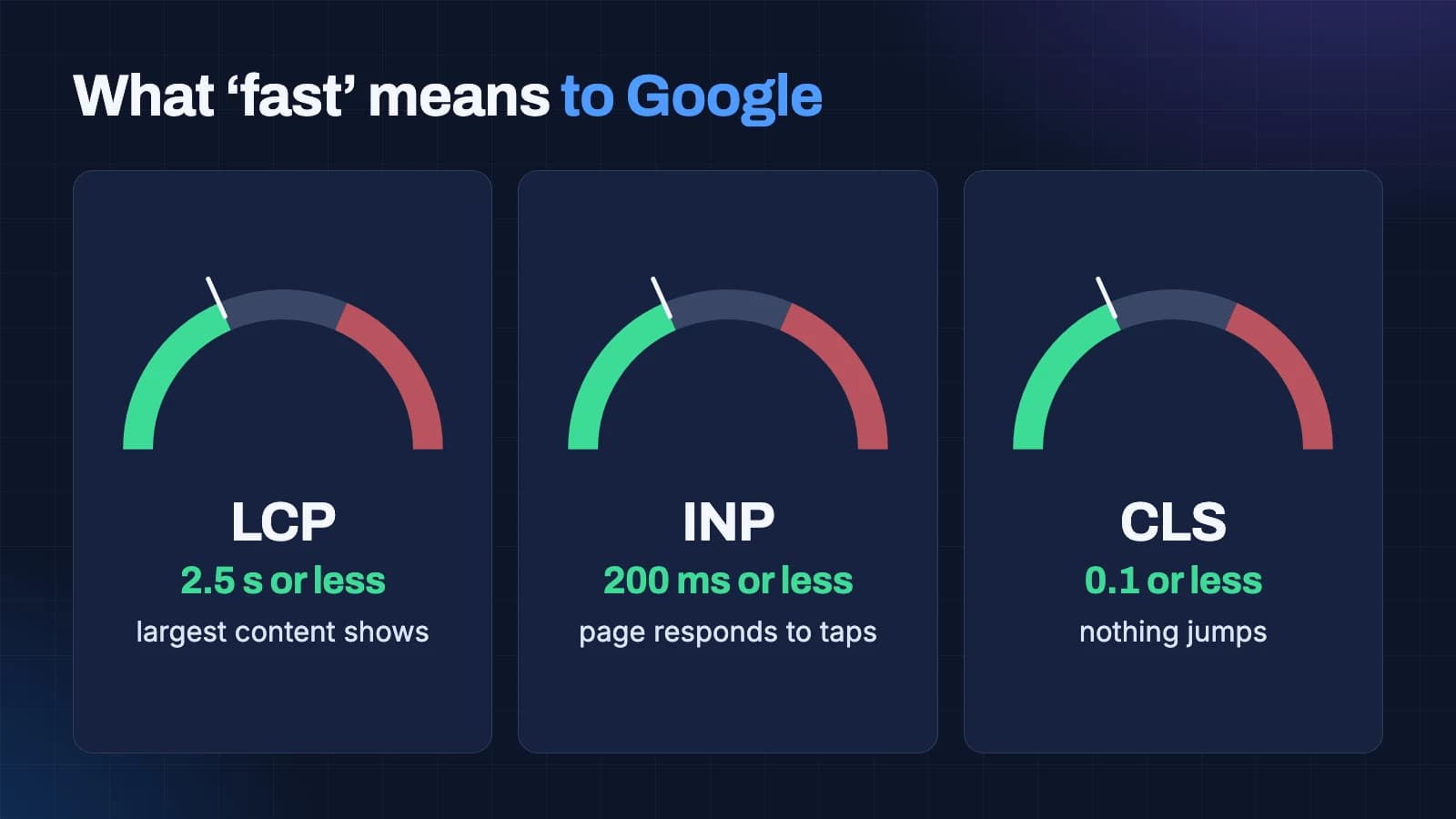
- Largest Contentful Paint (LCP): how long the main content takes to appear. Good is 2.5 seconds or less.
- Interaction to Next Paint (INP): how quickly the page reacts to a tap or click. Good is 200 milliseconds or less.
- Cumulative Layout Shift (CLS): how much the page jumps as it loads. Good is 0.1 or less.
These are measured on real visitors' devices, and most of your visitors are probably on phones, so what matters is how a site performs on an ordinary phone on an ordinary connection, not on the developer's laptop.
How each option tends to perform
Website builders have improved a great deal and many can meet these thresholds for simple pages. But you have limited control over the code they produce, so when a page is slow there may be little you can do beyond removing things.
Template sites often struggle, because they load code for features you do not use. They can be made fast, but it takes deliberate work to strip them back, and the work has to be repeated as the template updates.
WordPress with a custom theme starts light, because the theme contains only what your pages use. With good image handling, caching and hosting, it comfortably meets the thresholds.
Fully custom builds offer the most control. A developer can decide exactly what loads, when and in what order. That makes it possible to build pages that load almost instantly, but it is not automatic: a careless custom build can be as slow as anything else.
The honest summary is that speed depends more on the care taken than on the platform. But the further right you move on the spectrum, the more control you have over that care, and the less you are working against someone else's code.
Search engines and AI answers
Most businesses want their website to bring in customers from Google, and increasingly from AI tools that answer questions directly. All four options can produce a site that search engines understand, but they differ in how much control you have over the details.
The foundations are the same whichever way you build: one clear page for each thing you want to be found for, sensible headings, descriptive titles, fast pages, a clean link structure, structured data that describes your business, its services and its location, and content that genuinely answers what people ask. We go deeper into the newer side of this in our guides to answer engine optimisation and generative engine optimisation.
Website builders give you the basics through settings screens, and for a small site that is often enough. Their limits show up when you need detailed structured data, custom page types, or full control over how pages link to each other. Template sites depend heavily on the template's quality. WordPress with a custom theme and a good search plugin gives fine control. A fully custom build gives complete control, which matters most for larger sites with many services, locations or products.
One thing no option can do is guarantee rankings or AI mentions. Those depend on competition, content and how other sites refer to you. Choose the option that lets you build the foundations properly, then expect the results to come from ongoing work.
Ownership, lock-in and moving later
Ownership is the quiet difference between these options, and it only becomes visible when you want to leave.
With a website builder, you own your content but not the platform. Your words and images can usually be exported, but the design, the structure and many features cannot. Leaving means rebuilding.
With a template site, you own the site if the hosting and domain are in your name, but the design belongs to the template's licence and the structure is tied to it.
With WordPress and a custom theme, you should own everything: the content, the theme code and the hosting. WordPress runs on almost any host, so you can move freely.
With a fully custom build, you should own the code outright, provided your contract says so and you receive it in a repository you control. Ask about this before you sign.
In every case, insist that the domain and hosting are registered in your business's name, and that you hold the highest level of access to everything. A website you cannot move is a website you rent.
When a website builder is enough
It is worth saying plainly: many small businesses do not need custom development, and some do not need a developer at all.
A website builder is usually enough when:
- The site's main job is to show who you are, what you do and how to contact you.
- You need a handful of pages that will change rarely.
- Search is not your main source of customers, for example because they come through referrals, walk-ins or marketplaces.
- You or someone on your team is comfortable making small changes yourselves.
- You do not need the site to connect to other business software.
In that situation, a builder is often the most sensible choice, and money saved on the website is better spent elsewhere in the business. When owners in this position ask us for a custom build, we tell them so.
If you do choose a builder, set it up as carefully as you would any other website. Use your own domain, not the builder's free address. Write a clear title and description for each page. Add your business details consistently, matching your maps listing exactly. Compress photos before uploading them. And check the site on your own phone over mobile data before you call it finished. A simple site done carefully will serve a small business far better than an ambitious one done in a hurry.
When custom development pays off
Custom development earns its cost when the website is doing real work for the business, and when that work is held back by the limits of the other options.
The clearest signs that custom development will pay off are:
- The website is part of how you deliver your service. Customer portals, booking with real business rules, quote calculators, account areas, dashboards.
- It needs to connect to other systems. Your CRM, inventory, accounting software, payment gateways, or internal tools, in ways that plugins handle badly or not at all.
- You rely on search and ads for customers, and need fine control over speed, page structure and structured data across many pages.
- You have many services, locations or products, and need a structure that scales cleanly rather than a growing pile of similar pages.
- Your team is spending real time working around the current site's limits. If people are copying data by hand between the website and other tools, or waiting weeks for simple changes, that cost is already being paid.
- You expect the site to grow for years. The more it will change, the more a structure built for your business pays back.
Our dashboards and portals work is the clearest example: when the website is the place where customers log in, check status or submit information, a custom build is usually the only option that fits properly.
When WordPress with a custom theme is the sweet spot
Between the builder and the fully custom build sits a large group of businesses for whom WordPress with a custom theme is the best value. It tends to fit when:
- Publishing is a big part of the site's job: articles, case studies, service pages, news, team updates.
- Your team wants a familiar, simple editor and the freedom to publish without a developer.
- You want to own the site outright and be able to move hosts or developers freely.
- The site needs to be fast and well structured for search, but does not need to be an application.
For these businesses, a fully custom build would add cost without adding much that they would use, and a template would hold them back. If that sounds like you, our WordPress guide explains how to choose the right team for it.
What a good custom build process looks like
If you decide on custom development, the process matters as much as the technology. A good team works roughly in this order.
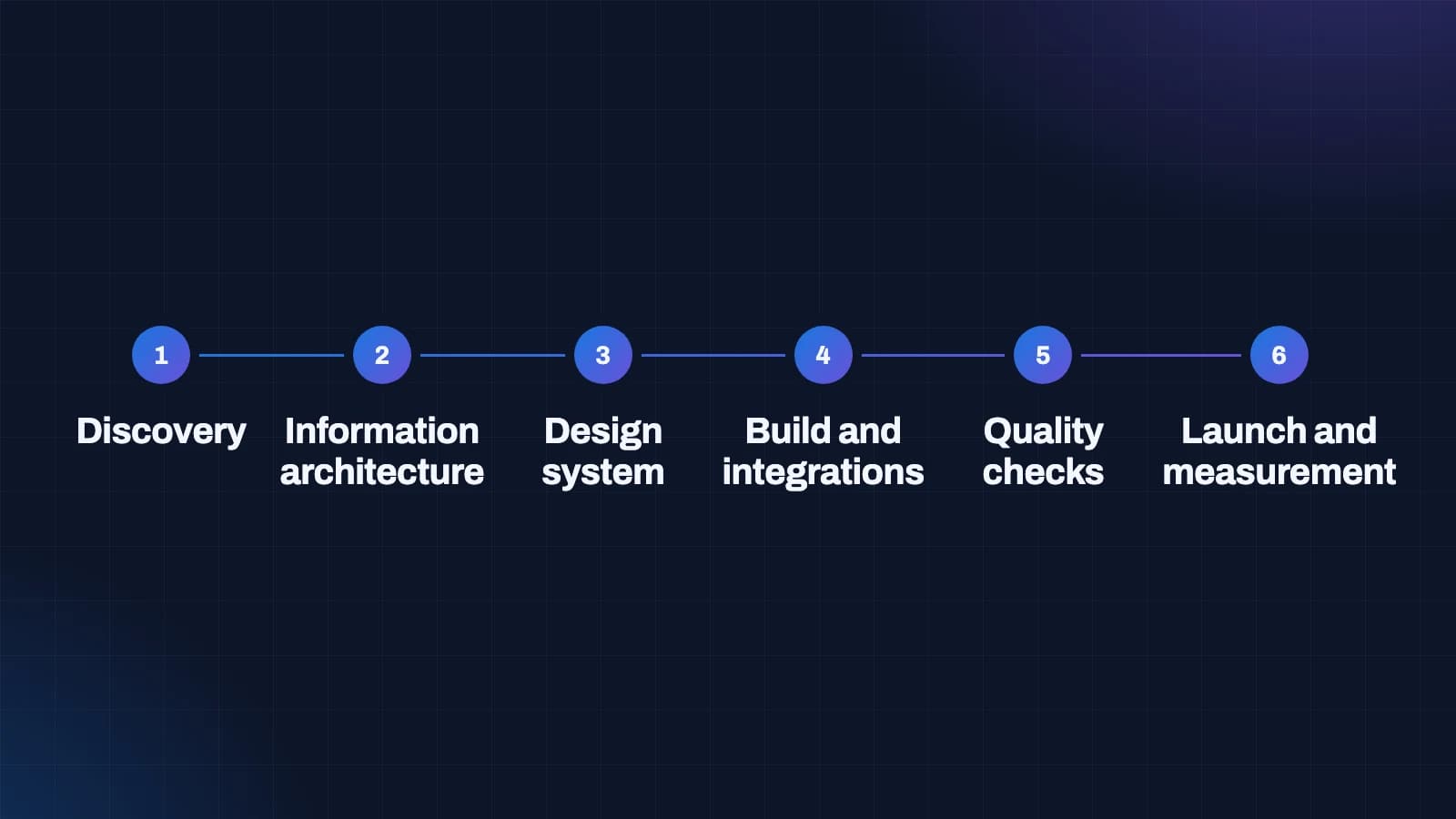
1. Discovery
Understanding the business, its customers, its competitors and what the website must achieve. For a custom build, discovery also covers the systems the site will connect to and the data it will handle. This is where most of the risk in a project is removed.
2. Information architecture
Deciding the structure: which pages and sections exist, how they relate, what each URL will be, and how content flows between them. For sites that rely on search, this is also where search demand shapes the structure.
3. Design system
Rather than designing every page one by one, a good team designs a system: type, colours, spacing and a set of components that pages are built from. This keeps the site consistent as it grows and makes new pages faster to build.
4. Build and integrations
Writing the site and connecting it to everything it needs: content editing, forms, your CRM, payments, analytics. Each integration should be documented, so the next developer can understand it.
5. Quality checks
Speed on real phones, accessibility, every form and integration tested end to end, security review, and redirects from any old site so that existing rankings and links carry over. We wrote about that last part in SEO for a website redesign.
6. Launch and measurement
Going live with analytics and search tools set up from day one, so you can see what the site is doing for the business and decide what to improve next.
The risks of custom development, and how to avoid them
Custom development is not risk-free, and it is fair to name the risks.
The project can grow without limit. Because anything is possible, scope can expand week by week. The protection is a written scope and a list of what is out of scope, agreed before work starts, with a clear process for changes.
You can become dependent on one developer. If only one person understands the code, you are exposed when they leave. The protection is clean, documented code in a repository you own, built with mainstream tools that other developers know.
It can cost more than it needed to. Some projects are built custom because the developer prefers it, not because the business needs it. The protection is asking the developer to explain, in plain words, why a simpler option would not work for you.
Editing can be harder than expected. A custom site still needs a way for your team to change content. Ask to see the editing experience early, and make sure it is part of the scope rather than an afterthought.
A good custom development partner will raise these risks with you before you sign. One that does not mention them at all is either very experienced at avoiding them or not thinking about them.
The risks of builders and templates, and how to avoid them
The cheaper options have risks too, and they are just as worth knowing.
You can outgrow them quickly. A site that fits today may not fit in a year. Before choosing, write down what you expect to add over the next two years and check the option can handle it.
Costs can creep. Builder plans and premium features add up, and template sites accumulate paid plugins. Track the yearly total, not just the monthly line.
Speed can slip. Every added feature or plugin adds weight. Check your Core Web Vitals every few months, especially after adding something new.
Leaving is expensive. Because a builder site cannot be exported in full, the switching cost rises the longer you stay. That is fine if you will not need to leave; it is worth knowing if you might.
How your team will edit the site
Owners often choose an option based on how the finished site looks, then discover months later that editing it is the real daily experience. It is worth comparing the options from the point of view of whoever will publish on the site.
Website builders are designed for non-technical people, and editing is usually pleasant. You see the page as you change it. The catch is that everything is possible within the builder's limits, which means pages can drift away from the original design as different people edit them over time.
Template sites vary a great deal. Some offer a clean editor; others hide content inside theme settings and page builder layouts that are confusing to anyone except the person who built them. Ask to see the editing screen before you commit.
WordPress with a custom theme gives your team the standard WordPress editor with a small set of blocks named after your content: a service card, a case study, a team member, a call to action. People choose a block and fill in its fields, so pages stay consistent without anyone policing them. For teams that publish often, this is usually the easiest option to live with.
Fully custom builds need an editing system to be designed as part of the project. That can be a headless content management system, a custom admin area, or content stored in files that a developer updates. Each works, but the choice has to suit the people who will use it. On our own site, articles, case studies and settings are edited in a custom dashboard built around exactly what our team changes most.
Whatever you choose, ask for a short training session at handover and written instructions for the most common tasks. A site your team avoids editing is a site that slowly goes out of date.
Security and maintenance compared
Every website needs looking after, but the work falls in different places depending on the option.
With a website builder, the platform handles servers, software updates and most security for you. Your responsibility is mainly strong passwords, two-step login and keeping the list of people with access short. This is one of the builder's real advantages.
With a template site, you or your developer are responsible for keeping the content management system, the template and every plugin up to date. Templates with many bundled plugins need the most attention, and an update to one can occasionally break another. Backups and security monitoring need to be set up deliberately.
WordPress with a custom theme has the same responsibilities, but usually fewer moving parts, because there are fewer plugins. That makes updates simpler and the site less exposed.
A fully custom build has a different profile. There are no plugins to update, which removes a whole class of common problems, but the framework and its dependencies still need updating, and the hosting needs to be configured securely. The quality of the original build and its documentation decides how easy this is.
For any option, ask three questions: who applies updates and how often, where backups are stored and how a restore is tested, and who is told if something goes wrong. If nobody can answer them, maintenance is not happening.
Accessibility across the options
An accessible website works for everyone, including people who use a keyboard instead of a mouse, people who rely on screen readers, and people who zoom in to read. The widely used standard is the Web Content Accessibility Guidelines, and level AA of the current version is a sensible target for a business site.
All four options can produce an accessible site, and all four can produce an inaccessible one. Builders and templates provide a starting point, but accessibility often breaks in the details: colour choices with too little contrast, images without descriptions, buttons that say "click here", and forms without proper labels. With WordPress and a custom theme, or a custom build, accessibility can be built into every component once and then inherited by every page, which makes it far easier to keep right as the site grows.
Ask whoever you hire which level they build to and how they test it. Accessibility is not only fair to your visitors; the same improvements tend to make pages clearer for everyone and easier for search engines to understand.
What about AI website generators?
A newer option is the AI website generator: you describe your business, and a tool produces a complete site in minutes. These tools are improving quickly and can be a useful way to explore layouts or produce a first draft.
They do not change the underlying choice, though. An AI-generated site still lives somewhere, usually inside a builder-style platform, with the same questions about ownership, speed, editing and growth. And the content they produce is generic by nature, written to sound plausible for any business of your type, which is the opposite of what makes a website persuasive or useful to search engines.
If you use one, treat the result as a sketch rather than a finished site. Replace the generated text with your own knowledge of your customers, check every claim it makes about your business, and judge the platform underneath it by the same questions as any other builder.
A simple decision path
If you want a quick answer, follow these questions in order:
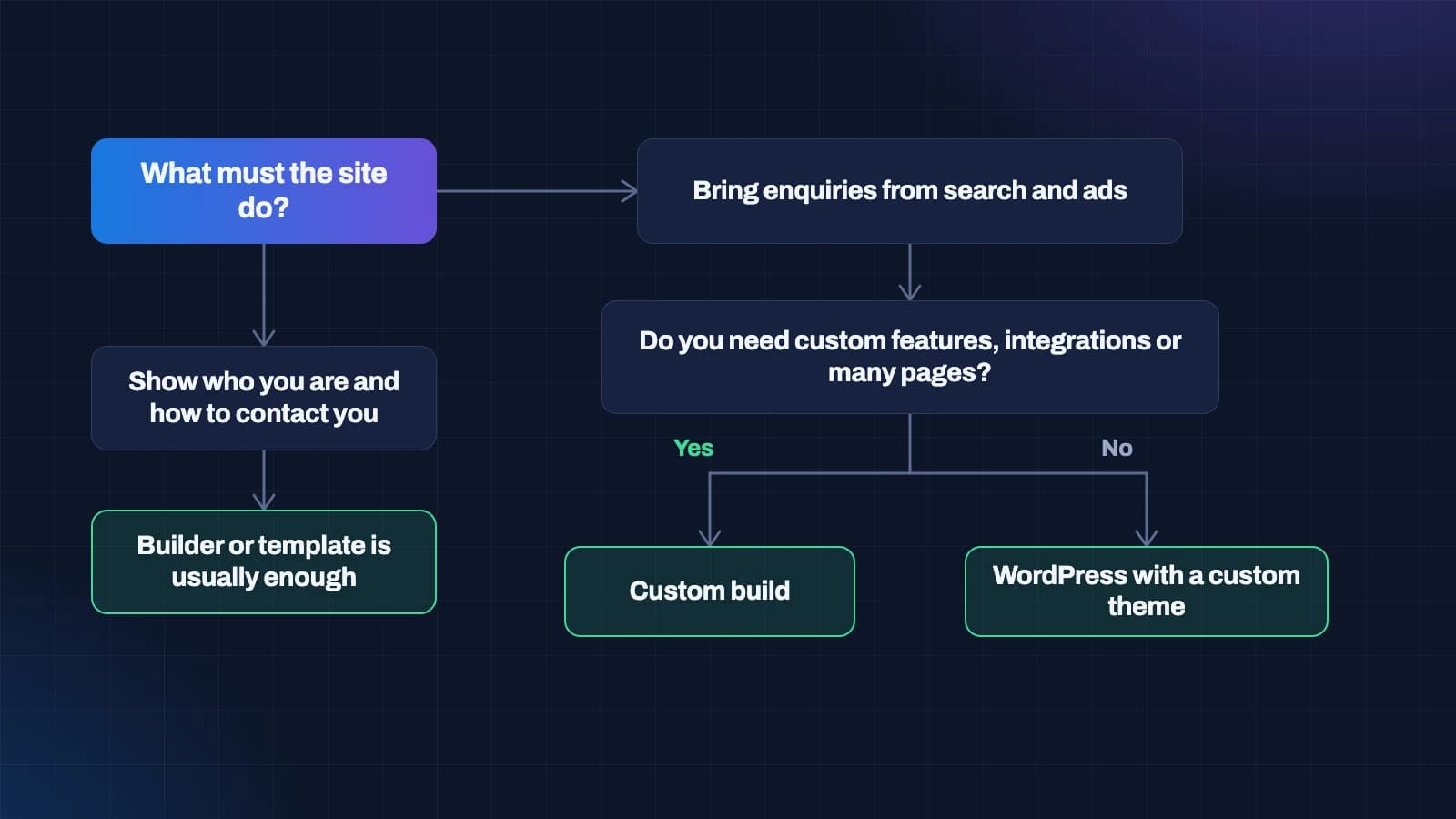
- What must the website do? If it mainly needs to show who you are and how to contact you, a builder or template is usually enough. If it needs to bring enquiries from search and ads, keep going.
- Does it need custom features, integrations or many page types? If yes, look seriously at a custom build. If no, keep going.
- Will your team publish regularly and want to own the site outright? If yes, WordPress with a custom theme is likely the best value.
- How long will you keep it? The longer the life, the more a structure built for your business pays back.
Then check the answer against a three-year cost view, not the build price alone.
Questions to ask whoever you hire
Whichever option you choose, these questions protect you:
- Which of the four approaches are you quoting, and why that one for us?
- What will we own at the end, and in whose name will the domain, hosting and code be?
- What will this cost over three years, including hosting, licences and maintenance?
- How will you measure speed, and can you show Core Web Vitals for a recent project, on a phone?
- How will our team edit the site day to day? Can we see an example?
- How will you protect our existing search rankings during the switch?
- What is in scope, what is out of scope, and how are changes priced?
- If we part ways, how would another developer take over?
The answers matter, but so does the way they are given. Clear, specific answers in plain language are a good sign. Vague answers, jargon and pressure to decide quickly are not.
Three businesses, three different right answers
To make the choice concrete, here are three typical situations and the option that usually suits each. They are illustrations, not real clients.
A neighbourhood bakery. Customers find it by walking past, through word of mouth and on a maps listing. The website needs opening hours, a menu, photos, a phone number and directions. It will change a few times a year. A website builder is the right answer, set up well and linked from the maps listing. Spending more would buy very little.
A professional services firm. A consultancy or a law practice wins clients through trust and search. It needs clear service pages, articles that answer the questions clients ask, case studies, team profiles and a strong enquiry path, and the team will publish regularly. WordPress with a custom theme is usually the best value: fast, well structured for search, easy for the team to run, and fully owned.
A business that runs on its website. A training provider with student logins and online exams, or a property business with project listings, enquiry tracking and a sales dashboard. The website is part of how the business operates, and it has to connect to other systems. A fully custom build is the option that fits without constant workarounds.
Most businesses will recognise themselves in one of these, or somewhere between two of them. Starting from what the site must do keeps the decision honest.
Common myths, briefly
"Custom always means expensive." Not always. A small custom site can cost less over three years than a template site that needs constant workarounds and paid plugins.
"Builders are bad for SEO." Not on their own. Many builder sites rank well for simple, local searches. Their limits show up on larger sites and more competitive searches.
"WordPress is insecure." WordPress itself is well maintained. Most security problems come from outdated plugins and careless setup. A well-built, maintained WordPress site is a sensible choice.
"A new website will bring more customers." A better website can help a great deal, but it works alongside your offer, your pricing, your service and your marketing. No website can guarantee customers on its own.
Planning for the next five years, not the next launch
The most expensive website mistakes come from planning for launch day instead of for the years after it. A site is launched once and lived with for a long time. Before choosing an option, picture the website three and five years from now.
Think about what the business will look like. Will you add services, open in new cities, sell online, hire more people, or move into new markets? Each of those means new pages, new content types or new features. An option that handles today's site comfortably but cannot grow will force a rebuild just when the business can least afford the distraction.
Think about who will run the site. If one person handles everything today, what happens when they leave or the job grows? The more people who will touch the site, the more it helps to have a structure that guides them, with named content blocks and clear page types, rather than a blank canvas anyone can rearrange.
Think about what you will measure. If the site is meant to bring in enquiries, you will want to know which pages and which sources produce them, and you will want to test changes. Check early that whichever option you choose lets you set up analytics, conversion tracking and search tools properly.
And think about the people who will maintain it. Mainstream tools with large communities, clean code and good documentation make it easy to change developers if you ever need to. Unusual or very old tools make it hard. This applies to custom builds as much as anything else: ask which framework and which hosting a developer proposes, and check that other developers could pick it up.
None of this requires predicting the future precisely. It only requires choosing an option that leaves room for the likely futures rather than closing them off.
Mixing approaches: you do not have to choose only one
Many businesses end up with more than one approach, and that is often sensible. A common pattern is a main website built properly, plus a few quick landing pages for campaigns made with a simpler tool. Another is a WordPress site for publishing, with a small custom application alongside it for a customer portal or a calculator.
The key is to keep the parts working together. Use one domain where possible, with the separate parts on clear sub-paths or subdomains. Keep the design consistent so visitors feel they are in one place. And make sure analytics follows visitors across all of it, so you can see the whole journey from first visit to enquiry.
Mixing approaches works best when it is a deliberate plan rather than an accident. If your website has grown into a collection of tools that nobody fully understands, that is usually the moment to step back and decide on one structure for the years ahead.
How we can help
We build both custom websites and WordPress sites, and we regularly tell owners when a simpler option is enough. If you would like a second opinion on a quote, or an honest view on which approach suits your business, we are happy to talk it through.
You can see the kind of work we do in our portfolio, or get in touch to arrange a conversation.
Questions people ask about this
Is custom web development better than a website builder?
Not always. A website builder is often enough for a small site that mainly shows who you are and how to contact you. Custom development pays off when the website does real work for the business, such as customer portals, integrations with other software, or a large site that relies on search and ads.
How much does custom web development cost compared with a template?
A custom build costs more upfront than a template. Over three to five years the gap often narrows, because templates tend to add paid plugins, workarounds and maintenance. Compare options on a three-year view that includes hosting, licences, maintenance, changes and your team's time.
Can a website builder rank on Google?
Yes, especially for simple and local searches, provided the pages are clear, fast and well described. Builders become limiting on larger sites with many services or locations, and where detailed control over structure and structured data matters.
Is WordPress custom development or a template?
It can be either. WordPress with a marketplace theme or page builder is closer to a template site. WordPress with a theme written for your business and custom content blocks is a custom build on a familiar platform, and suits businesses that publish regularly.
How fast should a business website be?
Google's published thresholds for a good experience are a Largest Contentful Paint of 2.5 seconds or less, an Interaction to Next Paint of 200 milliseconds or less, and a Cumulative Layout Shift of 0.1 or less, measured on real visitors' devices.
Will I own my website if it is custom built?
You should, but only if the contract says so and you receive the code in a repository you control, with the domain and hosting in your business's name. Ask for this in writing before you sign.

Manvika Sohal
Co-Founder, CEO & Director · LinkedIn
Challenges the assumptions behind positioning, user experience and growth before they turn into expensive decisions.
Start a conversation